
Some more Growl goodness

While we’re at it …
See that notification at the bottom of the screenshot (and the ever beautiful [Veer wallpaper][] which is more important this time):
The source of this notification is another AppleScript used with [Growl][]: It tells me in the most ideal way (for me) when a “Disposition Notification” receipt has been received by Apple Mail,1 by means of a rule that checks incoming mail headers for either text.
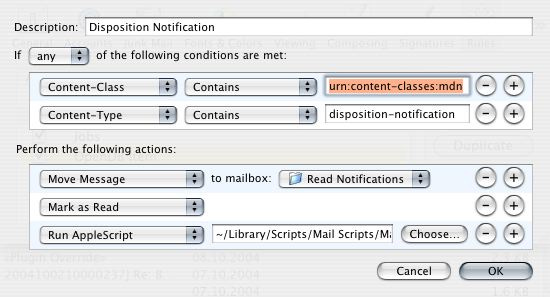
Note You’ll have to add the
content-classandcontent-typeheaders to the available list of headers by adding them via the menu item “Edit Headers” that will be available if you expand the Rule’s “Field” selector.
This is very handy:
These receipts can be marked as read by a rule in Mail, avoiding the “unread messages” on the corresponding folder, reducing disturbance by an important factor.
I get a clue when the mail message has been read, under the condition that I am sitting in front of my Mac.
The Apple Script I use in the Mail rule can be downloaded [here][script] and it looks like this:
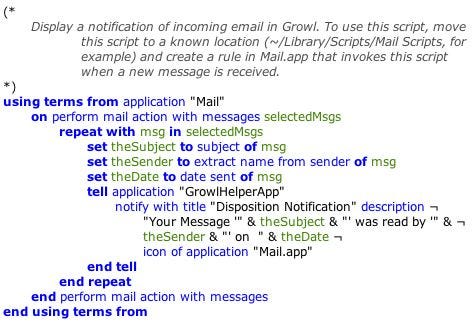
Again, this is a dropdead gorgeous example of the usefulness of these notification systems. I guess there are many more to add but I have the impression that this one could be useful to many of you – provided you are as maniac as me when it comes to “Disposition Notification” receipts … :)
As I said before, these receipts are especially useful in a corporate environment. Most other mailers either don’t honour them or the users are knowledgeable enough to disable the feature. :)
[growl]: http://growl.info “Growl - Notification system”[Veer Wallpaper]: http://www.veer.com/ideas/wallpaper/ “Veer Wallpaper”[Quicksilver]: http://quicksilver.blacktree.com “Quicksilver”[UI Notifications]: /2004/08/16/ui-notifications-lanosd/ “UI Notifications”[Daniel Wilson]: http://blog.wilsonet.com “Membranophonist’s Ramblings”[LanOSD]: http://oomz.net/Lanosd/ “LanOSD Homepage”[LaunchBar]: http://obdev.at/products/launchbar/ “LaunchBar”[43 Folders]: http://www.43folders.com/quicksilver “43 Folders”[Spotlight]: http://www.apple.com/macosx/tiger/spotlight.html “Spotlight – Search Technology”[Information]: /2004/08/03/to-dump-or-not-to-dump/ [at your]: /2004/06/29/dashboard-vs-konfabulator/ [fingertips]: /2004/06/29/spotlight-is-sweet/ [Apple Mail Plugins]: /2004/09/20/apple-mail-plugins-and-tools/ “Apple Mail Plugins”[MailPriority]: http://home.tiscalinet.ch/david.frank/mailpriority/index.html “MailPriority”[script]: http://mycvs.org/wp/wp-content/MailNotification.scpt.zip “Mail Notification Script”
In order to generate the Receipt Requests first-hand, you’ll have to install the [MailPriority][] plugin in Mail that I presented in my post on [Apple Mail Plugins][]. ↩︎